Showing posts with label Jelly Bean. Show all posts

Wednesday, May 6, 2015

How To Root Lenovo P780 Both Jelly Bean & KitKat [Tutorial]

Many of you are requesting me how to install custom ROM on Lenovo P780 and the official or Stock KitKat ROM is not good.  But recently s227 update is out and its fine still now. But still if you want to try other custom ROM on your Lenovo P780 then you need to first root your device. Root mean gaining some administrative access on you phone. And Here I want to mention than rooting your device violates warranty of your Phone. But in lenovo you can gain it back just by again installing Stock ROM or the official ROM.
android-root
So how to root your Lenovo P780 whether 4GB or 8GB version? Rooting you Lenovo P780 is easy and there is no big thing to be scared. Before going to proceed make it clear that procee is different for Kitkat version and jelly Bean version. Don’t apply Jelly bean method on your Kitkat version Lenovo P780 vice versa.
Here I have discuss how to root both KitKat version and Jelly Bean. Try according to your Android Version.

How to root Lenovo P780 KitKat Version

Step 1: Download iRoot and install on your PC
Step 2: Open iRoot (run as administrator)

Tuesday, April 30, 2013

How to Root Micromax A110 with Official Jellybean ROM 4.1.1 ?


 Steps:

1) http://d-h.st/zEb this is for the official mmx jb 1.11 rom
2) http://d-h.st/2Hn this is vcom drivers( download it and install it on your pc/laptop)

3) http://d-h.st/KyK this sp flash tool
4) http://linksredirect.com/?pub_id=562...ak733itivap95w THIS IS CWM RECOVERY FOR MMX A110( download this file on your computer and rename it " recovery.img" without quotes offcourse
5) http://linksredirect.com/?pub_id=562...erSU-v1.04.zip THIS is SU binaries

now to begin, first install mmx a110 drivers(connect your phone via usb now swithch off phone without disconnecting, wait for a few min drivers will be installed,) second download file no 2 (vcom drivers) install them on your pc/laptop

now if you have already flashed jb 1.11, then open sp flash tool, click scatter loading choose MT6577_android_scatter_emmc.txt, it will load everything , now deselect every option except recovery( very imp make sure u deselect every option except recovery) click on recovery and choose the file you downloaded in option 4( and renamed recovery.img) 
now turn off your phone, take out the battery, and keep it aside, 
in sp flash tools click download button(not firmware upgrade) after that connect your phone(in powered off battery rmoved state) via usb, and you will have cwm recovery. 
now after flashing, close flash tool, disconnect phone and power up,
now transfer the files you downloaded in step 5, to your sd card. now switch off the phone, hold vol down +vol up+ power button, get into recovery follow instructions there and get into cwm recovery, now choose option install from sd card and go to the files you transferred to your sd card from pc(one u downloaded in step 5) and just install them, NOW GIV URSELF A HIGH FIVE YOU HAVE ROOTED UR MMX 

FOR FURTHER ASSISTANCE YOU CAN REFFER TO THESE THREADS,
1) http://forum.xda-developers.com/show....php?t=2167244
2) https://www.google.co.in/url?sa=t&rc...N58fek2xrPmFQg

..........................................
Source : http://forum.xda-developers.com/showthread.php?p=40250554

Saturday, March 2, 2013

Install and root Jelly Bean on Micromax A110: Easier Method

Given the fact that it is generally more difficult for beginners to use SP Flash tools than to use Bin4ry’s script, this method to install and root Micromax A110 is surely easier than any previously posted methods. Paplu3, a xda member, has made a clockworkmod flashable zip file that can be easily flashed to get rooted Jelly Bean rom on your device. I shall explain how you can use that file to get Jelly Bean on your device. I decided to write this post after I saw that a few of our readers were not able to install clockworkmod on their device using Flash Tool after installing the Jelly Bean rom. This easier guide will help you do the job.

Notable Features of the CWM Flashable Jelly Bean ROM:
  • Stock Cynus T2 Jelly Bean ROM
  • Mobistel boot animation is changed to Micromax boot animation
  • Second sim problem fixed with Stock ROM v2’s modem.img
Before installing a new rom, it is always advised to backup your important stuff like contacts and apps. To backup your contacts, go to your Contacts, press menu, select import and export and finally select export to SD card. To import later on, select import from SD card. Titanium backup is everyone’s best bet to backup their apps along with data.

How To: Install Rooted Jelly Bean on Micromax A110
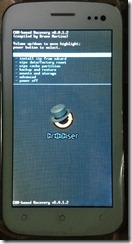
    micromax_a110_cwm_recovery
  1. Root your Micromax A110.
    Note 1.1: Obviously, you have to skip this step if you have already rooted your phone.
    Note 1.2: If you are a reading bug, read more about rooting.
  2. Install Clockworkmod Recovery using Mobile Uncle Tools.
    Note 2.1: Again, skip this step if you have already installed clockworkmod recovery on your device.
    Note 2.2: If you aren’t sure what clockworkmod recovery is, read this.
  3. Download this Zip file. This zip file is a clockworkmod flashable version of Cynus Stock T2’s stock Jelly Bean rom.
    Note: You don’t have to extract the file.
  4. Transfer the downloaded zip file to your phone’s SD card.
  5. Switch off your phone.
  6. Press Volume Up + Volume Down + Power button simultaneously till the screen lights up.
  7. A screen will ask you whether you want to go to Recovery or to Factory mode. Press Volume Up to go to Recovery mode.
  8. Select the Install Zip from SD card option and browse and select the zip file you downloaded in step 3.
    Note for first-time Clockworkmod users: Press Volume Up to Scroll Up, Volume Down to scroll Down and Power button to select the highlighted option.
  9. After the installation of the zip file completes, select “Wipe Data/ Factory Reset”.
  10. To calibrate your battery, you should go to Advanced >> Wipe Battery Stats.
  11. The flashing process is now completed. To exit clockworkmod recovery, select reboot phone now.
  12. Check if your phone is rooted.
This is it. You are done installing the ROM. As stated above, this rom is pre-rooted, you don’t need to root it again. Enjoy the bugless Jelly Bean on your A110. If you notice a deteriorated camera quality, read this.
If you are facing troubles or having trouble understanding anything in this article, start a topic regarding your problem in an appropriate section on our forums. Doing this will increase your chances of getting a solution even if I couldn't personally reply to your problem.
....................................
Source : http://www.droidiser.com/2013/03/install-jelly-bean-root-micromax-a110-easily.html
Buy Best Smartphones at Low Price in India.

1.  MICROMAX CANVAS NITRO A311 Specifications : Dual SIM, 3G Android v4.4.2 (KitKat) (can be update to Android Lollipop...